When you’re working with Jupyter Notebooks, the hidden state will inevitably find you. You define a variable in cell 15, redefine it in cell 2, and when you revisit that notebook two days later, you won’t know why anything works (or doesn’t). Jupyter gives you no map of what actually depends on what.
That’s the first problem but the second hurts more.
Behind the scenes, a .ipynb file is an extremely bloated JSON structure: it contains code, outputs, metadata, execution history, all of it entangled in a format designed for display, not for machines. When an AI agent reads your notebook, it reads all of it. Every stale output and redundant cell from a late night data exploration.
I take care of my agents. Every token that goes into their context window is intentional. Marimo respects that.
// What Marimo Actually Is
Marimo starts from a different assumption: a notebook should be a Python script, not a document.
When you write a Marimo notebook, you’re writing a .py file. There’s no hidden JSON state. No execution order ambiguity. Instead, Marimo builds a dependency graph of your cells automatically: if Cell B uses a variable defined in Cell A, Marimo knows that. Change Cell A, and Cell B updates reactively. Automatically. Every time.
This means reproducibility (disregarding random state) isn’t something you discipline yourself into. It’s enforced.
Two commands to get started:
pip install marimo
marimo edit your_notebook.py
That’s it. The rest of what I’m about to show you is already there.
// The AI Features: Where It Gets Interesting
The format change could have made me switch but the AI features made the case. Its AI integration is architectural and it operates across three distinct modes that are worth understanding in order.
Mode 1: Inline Copilot
The most familiar layer. Tab-completion inside cells, similar to Databricks Notebooks, Cursor, etc. Marimo supports GitHub Copilot, Windsurf, and custom models natively. This is the least interesting part.
Mode 2: Chat with Context Injection
This is where Marimo earns its differentiation.
Here’s the experiment I ran. I loaded the UCI Credit Card Default dataset: 30,000 credit card clients, ~6,600 defaults, a standard credit risk problem. Then I opened Marimo’s Chat sidebar and typed:
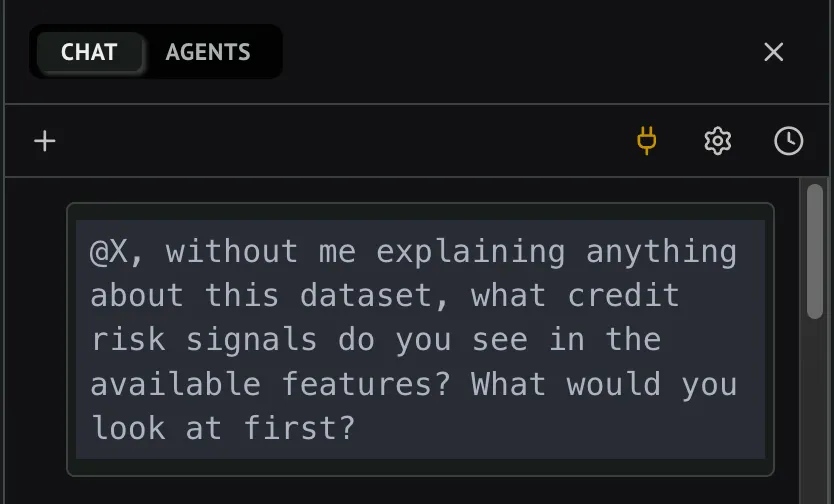
That @X is the entire secret. One symbol, and Marimo injects the variable context into the prompt: the column names, the data types, the schema, without me writing a single description and without flooding the context with the entire notebook history.
This was the AI response:
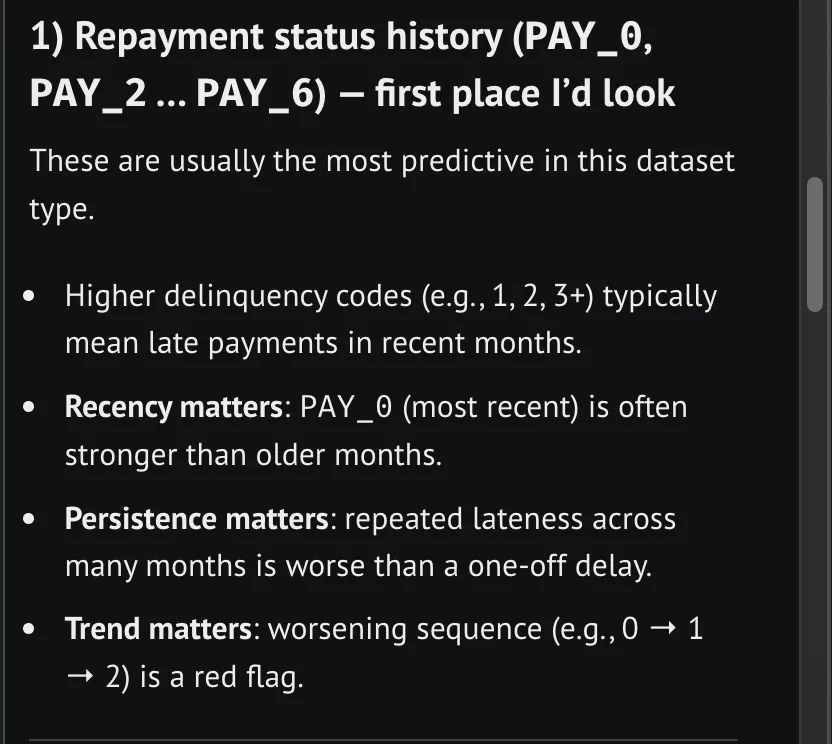
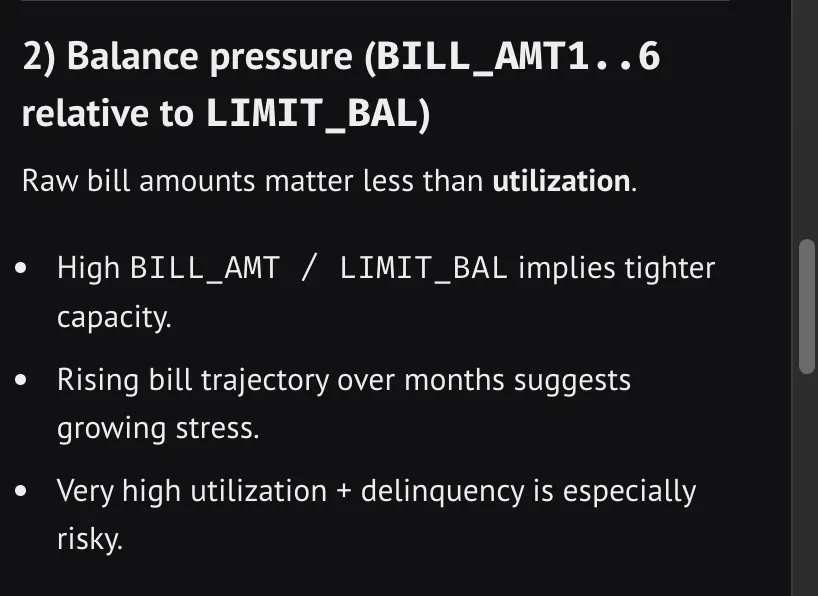
That’s actual context: the AI gets exactly what it needs to reason accurately, delivered at the cost of a single symbol rather than a paragraph of copy-pasted schema.
The Chat panel also has a read-only Ask mode that goes further, it enables the AI to actively inspect your notebook, browse connected data sources, and gather context on its own before responding.
Mode 3: The Agent
This is the real gold. You can connect it directly to your Claude Code via Agent Client Protocol. Just run this:
npx stdio-to-ws "npx @zed-industries/claude-code-acp" --port 3017In Agent mode, the AI can add, edit, remove cells, and run stale ones. Autonomously. And because Marimo is a lean Python script rather than a bloated JSON document, the agent isn’t wading through layers of embedded outputs to understand what your notebook is doing. It reads the code directly.
This is currently in beta. But I believe Marimo is building toward a notebook where you describe the analytical question and the tool helps you reach the answer without burning context on format overhead.
// The Part I’m Saving for the Next Post
Underneath everything I’ve described is something worth its own article: Marimo’s dependency graph.
The reason the AI features work reliably, and there are no forms of hidden state, is because Marimo tracks exactly which cells depend on which variables. The DAG is the architecture that makes the AI trustworthy, not just capable.
// A Format Built for How We Actually Work
The Jupyter notebook format has been mostly frozen since 2014. The way we work with AI has changed completely in the last two years.
I like Marimo because it takes AI seriously into a Data Science workflow. It gives AI agents something they can actually reason about efficiently: a clean Python script with an explicit dependency structure and no embedded history bloating their context window.